Here's a thing worth knowing if you coach on video: your Zoom setup and your filming setup are the same setup.
Same light, same lens height, same framing, same microphone problem. Fix it once and both get better — which means the hours you already spend on calls stop being wasted and start being practice.
Most coaches have it backwards. They accept a poor Zoom picture as just how Zoom looks, then try to build a separate "proper" setup for content. You don't need two. You need one that's right.
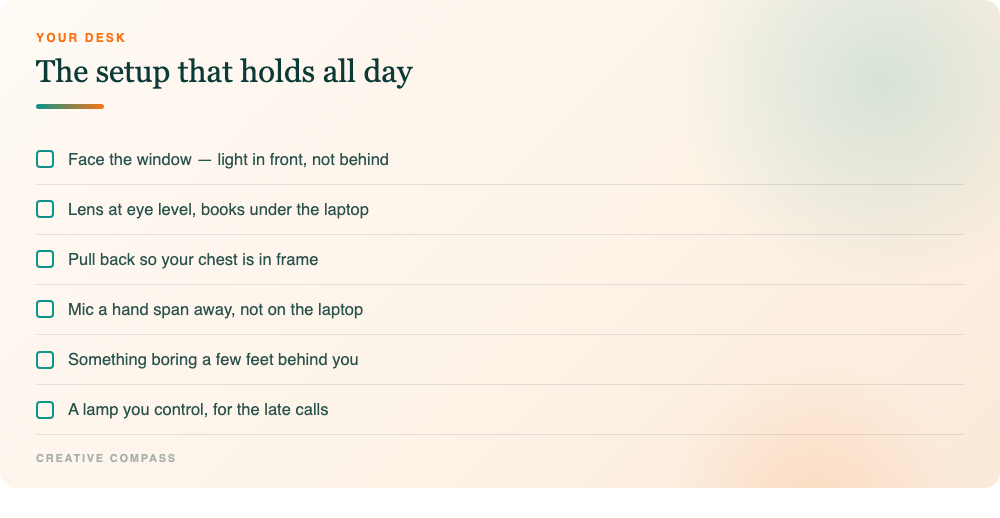
Face the window. That's the whole lighting fix.
If you do one thing from this post, do this.
Turn your desk so you're facing a window, with the light coming at your face rather than from behind or off to one side. That single change does more than any lamp you could buy: it evens out your skin tone, softens the shadows, and brings a calm quality that costs nothing.
Backlighting is what ruins most calls. A window behind you means the camera exposes for the bright background and leaves your face dark — which reads, unfairly, as low energy. Unless you're doing it deliberately for effect, get the light in front.
If there's no usable window, any single soft light in front of you at roughly eye height does the job. One light in the right place beats three in the wrong ones.
Get the lens to your eye level
Laptops sit low. That means the camera is below you, looking up — which gives you the unflattering angle, and more importantly puts the viewer underneath you.
Raise it. Books, a stand, a shelf, anything. You want the lens at your natural eye level or a touch above, which softens your features and keeps shadows from pooling under your eyes.
While you're there, fix the distance. Sitting too close crops out your shoulders and hands, and those are doing a lot of your communicating. Pull back so your chest is in frame and you can gesture without leaving the shot.
Sound matters more on a call than it does on video
On a recorded video a viewer tolerates imperfect audio because they chose to watch. On a call, poor audio is work — people lean in, concentrate harder, and tire faster. They won't tell you. They'll just be a bit less present.
The fix is the same as everywhere: get the microphone closer. Your laptop mic is a metre away, pointed at the ceiling, picking up your keyboard and the room.
If you're buying something for this specifically, a USB desk mic is the right shape of answer — plug in, no interface, and it records onto the same track as the video in Zoom or Loom, so there's nothing to sync afterwards. A good one sits a hand span from your mouth and quietly removes the strain nobody mentions.
A word on webcams
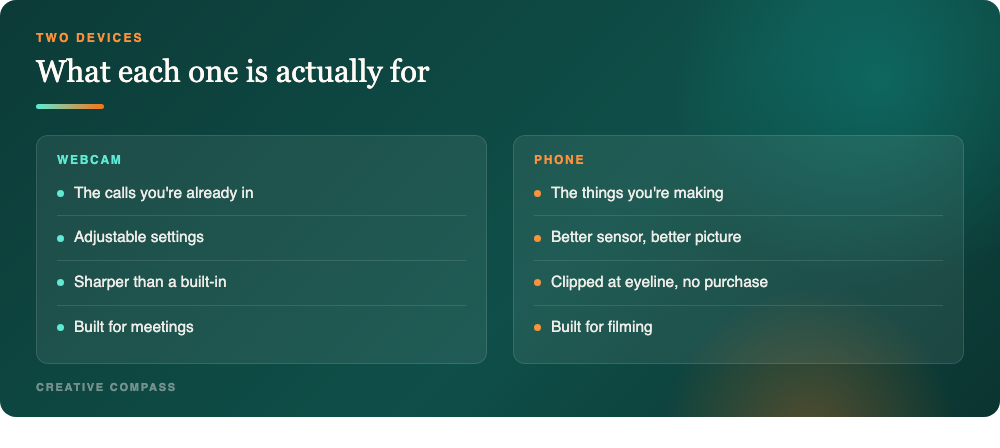
A dedicated webcam is a real improvement on a built-in one, and if you spend your days on calls it's worth having. The settings are adjustable and the picture is sharper.
But here's the honest limit, and I'd rather say it than sell you something: a webcam is not my first choice for filming content. It's built for calls. When I'm making something that matters, the phone wins — clipped to the laptop with a mount so the lens lands at eyeline, acting as the camera input. Better sensor, better picture, no extra purchase.
So: webcam for the meetings you're already in, phone for the things you're making. There's no rule saying it has to be one device.
Where to look when you're sharing your screen
A specific problem that comes up constantly in coaching calls, and almost nobody has a plan for it.
The moment you share your screen, your eyes go to the shared content — which is now where your attention genuinely is, and which is almost never near your camera. For the next ten minutes the other person sees the side of your face.
Two fixes, both free.
Move the window you're looking at as close to the lens as you can. If you have two screens, put the shared content on the one with the camera, not the other one. If you have one screen, drag the window to the top of it rather than the bottom. You're trying to shrink the angle between what you're reading and where they are.
Say when you're looking away. "Let me pull this up" does an enormous amount of work. People don't mind you looking elsewhere; they mind not knowing why. Narrating the glance turns it from evasion into process.
The same applies to notes. Notes beside the lens, high on the screen, never in your lap — looking down repeatedly reads as disengaged even when you're reading the thing they just said.
Check what's behind you
Thirty seconds, once.
Is anything in frame pulling the eye off your face? Cables, a half-empty mug, laundry, a lamp apparently growing out of your head. A background a few feet behind you looks better than a wall right at your back, because the gap gives the shot some depth.
You don't need a studio. You need boring on purpose.
The hour-three problem
One more thing, because coaching days are long and this is where a good setup quietly pays off.
By your third call of the day, the setup you can tolerate and the setup that's actually serving you have diverged. A screen slightly too low means three hours of a subtly bowed neck. A dim picture means three hours of the other person working harder to read you, which they experience as the session being heavier.
The checks that matter most over a long day:
Screen height, because your neck will tell you by call four. The lens at eye level fixes your picture and your posture in the same adjustment.
Light that doesn't change. If you're relying on the window, the light you set up at nine is gone by three — and the late calls, which are the ones where you're most tired, are the ones you'll look worst on. A single lamp you control beats a beautiful window you don't.
Audio, because fatigue is cumulative. Poor audio costs the listener a small amount of effort per minute. Over a full day of calls that adds up to people finding you tiring without being able to say why.
None of this is vanity. It's the difference between finishing the day tired because you worked hard, and finishing it tired because your setup charged you rent all day.
A word on virtual backgrounds
Short version: use a real background if you possibly can.
Virtual backgrounds need the software to decide, many times a second, where you end and the room begins. It gets it wrong at the edges — your hair flickers, a raised hand disappears, the rim of your glasses dissolves. Viewers don't consciously register the glitching, but it quietly costs you the sense that you're really there.
They also punish gesture, which for a coach is the wrong trade. The moment you lean forward or move your hands, the edge detection struggles most.
If you need one — shared space, private room, genuine reason — give it the best chance: even light on your face, nothing behind you the same colour as your clothes, and avoid patterned shirts. A plain blurred background usually holds up better than a photographic one, because blur failing looks like blur.
Why this is worth the half hour
Because a zoom setup for coaches isn't really about Zoom.
Every call you take is a rep. If your light, lens and sound are right, you spend those hours getting used to seeing yourself look well — which is quietly the thing that makes hitting record feel less like a performance later.
If they're wrong, you spend the same hours building a slightly worse relationship with your own face.
Same setup. Same thirty minutes. Do it once and stop deciding.
Do this today
Turn the desk toward the window. Put the laptop on books until the lens is at your eyes. Pull back so your chest is in shot. Move the mic closer. Look at what's behind you and turn the chair until it's dull.
Then join your next call, and notice the difference before anyone mentions it.